01 · Local-first · your storage
Sync without surrendering control.
Pair a local folder with S3, WebDAV, or SFTP. Preview the plan, then push, pull, or sync both ways. No account, no telemetry, nothing in the middle.
- Trial
- 14 days
- License
- One person · 5 devices
- Updates
- Lifetime updates
02 · Direction
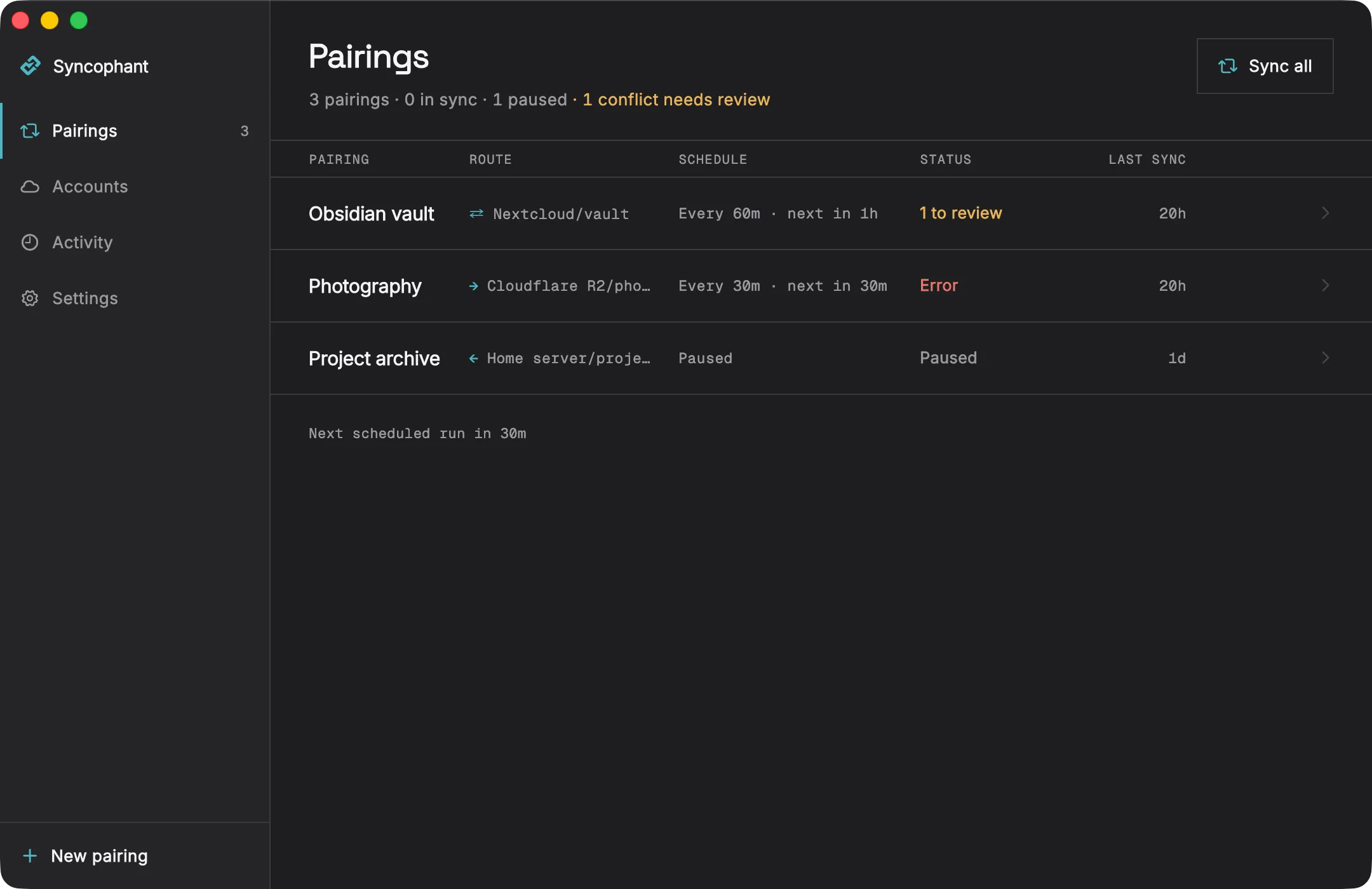
Push, pull, or sync both ways.
Every folder pairing says which side leads. You can change it later, but the next run is never ambiguous.
- Push
- Photography → Cloudflare R2/photos
- Pull
- Project archive ← Home server/projects
- Two-way
- Obsidian vault ⇄ Nextcloud/vault
This device leads.
Local changes upload. Files you remove here are removed there too, once the plan clears your delete guard.
The remote leads.
Remote changes download here. A preview lists what arrives and what would go, before anything moves.
Both sides stay current.
Changes move both ways. Edit the same file in two places and Syncophant keeps both copies, then waits for you to pick one.
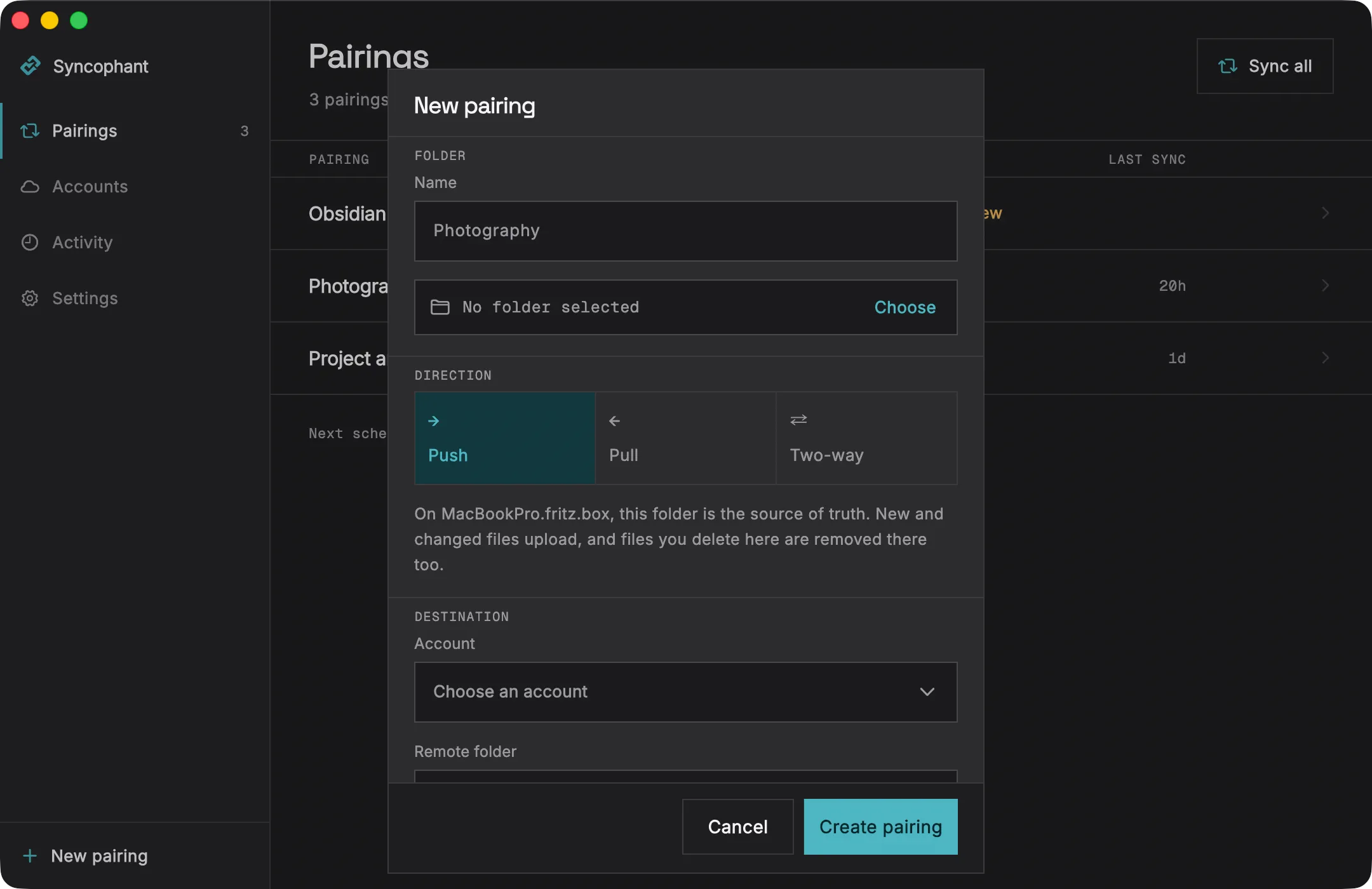
Direction in plain language
The sheet names your own machine while you choose. Push reads: on this Mac, this folder is the source of truth. New and changed files upload, and files you delete here are removed there too.
Credentials go to the system keychain · never to a file
03 · Preview and deletion
See the plan before anything moves.
You can preview every run: what uploads, what downloads, what would be removed, counted and totalled. A run that would remove 10 or more files and more than a quarter of the destination stops and asks first.
Counted, then confirmed
The plan lists every file with its size and reason. Nothing moves until you read it and confirm.
Large deletions pause
Syncophant can delete files, because mirroring a deletion is the point of push and pull. So the guard names the number and waits.
04 · Conflicts
Conflicts wait for you. They never block.
Edit the same file in two places and both versions are kept, already on disk. The open conflict names your copy and theirs, and three buttons settle it. The pairing keeps running meanwhile.
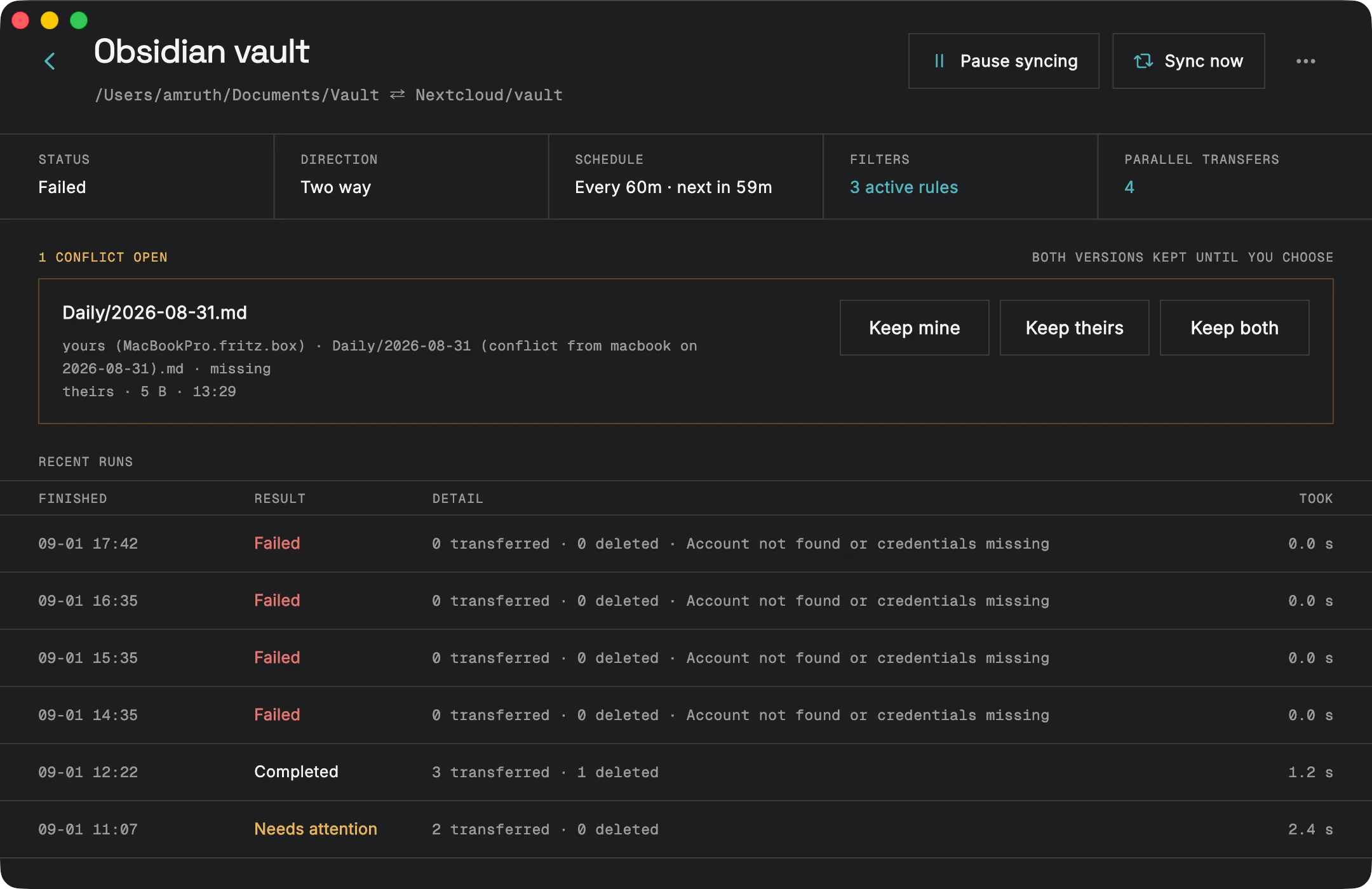
- Keep mine
- Your copy wins and the other is replaced on the next run.
- Keep theirs
- The remote copy wins, and yours is kept until the run completes.
- Keep both
- Your copy is renamed with the device name and date. The other keeps its name.
05 · Storage
Storage you already own.
A bucket, a Nextcloud, a box you can SSH into. Files are stored as plain files, so the remote stays browsable and you are not locked in.
S3-compatible
AWS S3, Cloudflare R2, Backblaze B2, MinIO, Wasabi. Endpoint, bucket, access key, and secret. For multipart uploads Syncophant reports no checksum rather than inventing one.
WebDAV
Nextcloud, ownCloud, Apache mod_dav, Fastmail Files. Any server that answers a Depth-1 PROPFIND. Server URL, username, and password.
SFTP
Any SSH server. Host, port, username, and base path, then a password or a private key.
A GitHub provider is written and waiting on its first run against a real repository. Google Drive, Dropbox, and OneDrive are planned. None of them appear in the app until they can connect.
06 · No middle
Nothing sits in the middle.
Each device talks straight to the storage you configured, using credentials you supply. There is no Syncophant cloud, account, relay, or telemetry endpoint in between.
- Credentials
- System keychain
- Availability
- macOS · Windows · Linux · Android
- Transport
- HTTPS or SSH
07 · Lifetime license
Pay once. Keep every update.
One person can use Syncophant on up to 5 devices, including for commercial work. No Syncophant account required.
Lifetime license
€25
- License
- One person · 5 devices
- Included
- Lifetime updates
08 · Try it
Start with the full trial.
The first 14 days need no card and no account. Download the public trial installer for your platform, then activate a license after purchase.
- macOSYour systemDisk image, drag to ApplicationsSyncophant-macos.dmg
- WindowsYour systemPer-user installer, no admin promptSyncophant-windows-setup.exe
- LinuxYour systemDebian and Ubuntu, x64Syncophant-linux.deb
- AndroidYour systemAPK, sideloadSyncophant-android.apk
Portable archives for macOS, Windows and Linux sit beside the installers. Check any download against SHA256SUMS.txt.
After purchase
Download the trial installer, buy a lifetime license, then enter your license key in the app to activate this device.
Need help with a license? Contact support@syncophant.app.
09 · Changelog
Every release, written down.
What changed, when it shipped, and the installers for that exact version. Release notes are published in English.
0.1.0
- First public release.
- Pair a local folder with S3-compatible storage, WebDAV, or SFTP, and push, pull, or sync both ways.
- Preview any run before it applies: what uploads, what downloads, and what would be removed, counted and totalled.
- A run that would remove 10 or more files and more than a quarter of the destination stops and asks first.
- Two-way conflicts keep both copies on disk and wait in a review queue for Keep mine, Keep theirs, or Keep both.
Do I need a Syncophant account?
No. There is no Syncophant server. Each device talks straight to the storage you configured, using credentials you supply, and those credentials stay in the platform keychain.
What happens when I edit the same file in two places?
In two-way mode Syncophant keeps both versions. Your copy is renamed with the device name and date, the other keeps its name, and the pair waits in a review queue until you choose Keep mine, Keep theirs, or Keep both.
Can it delete my files?
It can, because mirroring a deletion is the point of push and pull. A run that would remove 10 or more files and more than a quarter of the destination stops and asks first, and every run can be previewed before it applies anything.
Does background sync work on a phone?
Partly, and the app says so. Android runs background work at most every 15 minutes and delays it to save battery. iOS decides on its own schedule and may skip days. Both also sync whenever you open the app, which is the only timing either can promise.
Is my data encrypted?
Transport uses whatever your storage speaks, normally HTTPS or SSH. Files are stored as plain files so the remote stays browsable and you are not locked in. There is no client-side encryption yet.
Why does my system warn that the app is unsigned?
Desktop releases are not code signed yet. On macOS the first launch is blocked: open System Settings, then Privacy & Security, then Open Anyway. On Windows, SmartScreen warns: choose More info, then Run anyway. Every release ships a SHA256SUMS.txt you can check your download against.